


Crypto beginners and enthusiasts often find Cash App’s support for Bitcoin a standout feature. The app allows you to send Bitcoin seamlessly using the Bitcoin Network or the Lightning Network. This guide will walk you through the updated steps for 2024, explain key features, and provide insights for a secure and efficient experience.
How to Send Bitcoin on Cash App 2024
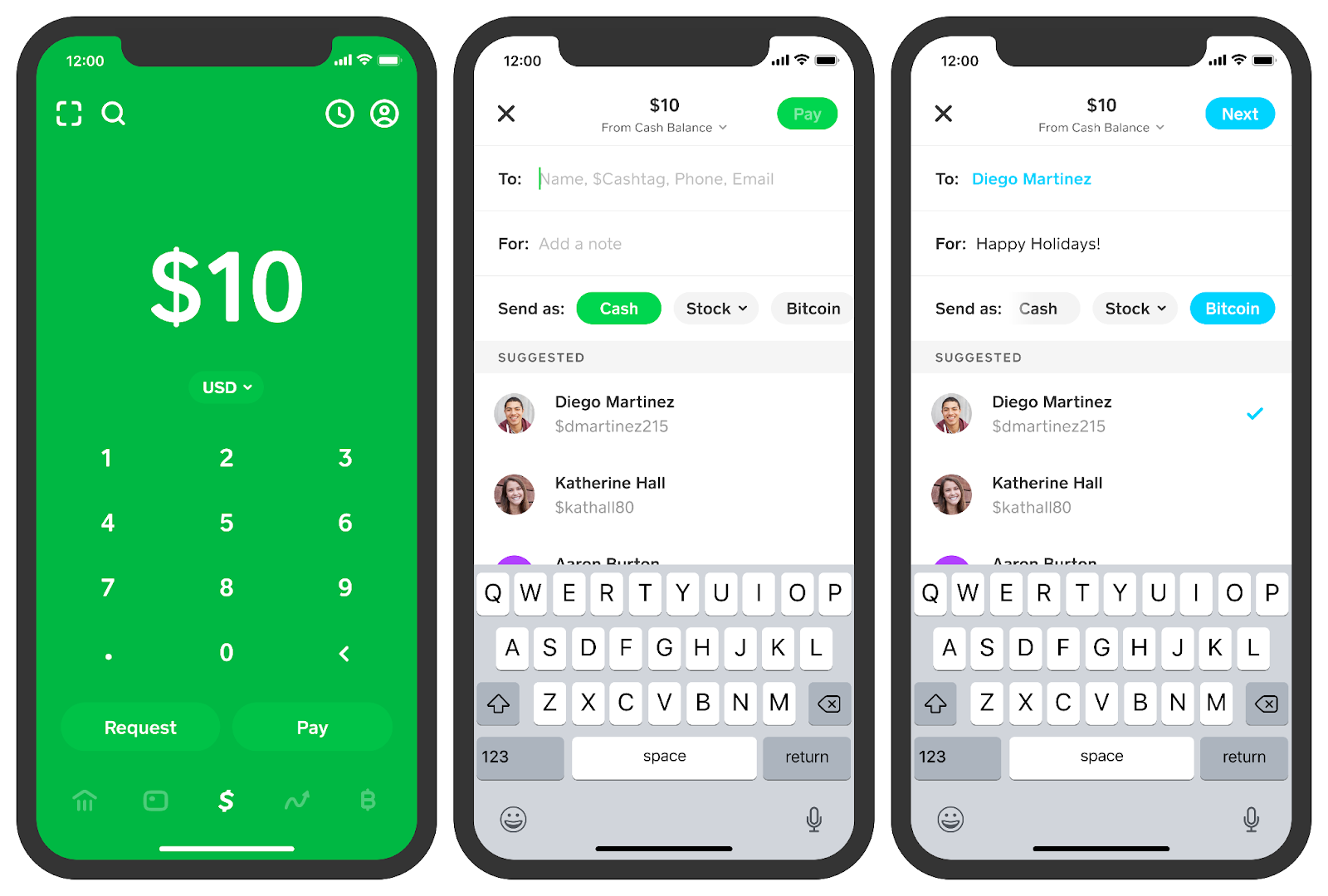
Source: Cashapp
- Set Up Cash App: Download Cash App and create an account if you haven’t already. Link your bank account or debit card to enable Bitcoin transactions.
- Enable BTC on Cash App: Navigate to the “Bitcoin” tab under the “Investing” section. If prompted, complete the verification process by providing your full name, date of birth, and Social Security number.
- How to Buy Bitcoin on Cash App: To purchase Bitcoin, tap “Buy” in the Bitcoin section, enter the amount in either BTC or USD, and confirm your purchase.
- How to Transfer Bitcoin to Cash App: Tap on the “Bitcoin” tab, select “Deposit Bitcoin,” and follow the instructions to transfer Bitcoin into your Cash App wallet.
- Sending Bitcoin:
- Tap the “Send” button in the Bitcoin section.
- Enter the recipient’s $cashtag, email, or phone number. Double-check for accuracy.
- Input the Bitcoin amount you want to send, either in BTC or your local currency.
- Choose Network: You can select the Bitcoin Network (slower but more reliable) or the Lightning Network (faster and often free). Understanding the difference between the Bitcoin Network vs. Lightning Network on Cash App helps you choose the best option for your transaction.
- Review all details, and tap “Confirm” to send.
6. Transaction Status: Once confirmed, Cash App will process the transfer. You’ll be notified when it’s complete.
Managing Bitcoin Limits on Cash App
Cash App imposes weekly and monthly limits on Bitcoin transactions. To check your limits:
Bitcoin transactions on Cash App are subject to specific weekly and monthly limits, which can impact how much you can send or receive. These limits vary depending on your account status and whether you have completed the verification process.
- How to Check Your Limits:
- Open the Cash App and tap your profile icon in the top-left corner.
- Scroll to find “Cash Support” and search for “Limits.”
- Here, you can see your weekly and monthly thresholds for both sending and receiving Bitcoin.
- Increasing Your Limits:
- Completing the identity verification process is the primary way to increase your Bitcoin limits. Verified accounts typically have higher thresholds compared to unverified ones.
- Verification includes entering your full name, date of birth, and Social Security number, and may also require submitting a photo ID for added security.
- Once verified, you might still need to monitor your activity as Cash App can adjust your limits based on your transaction history and account behavior.
Can I Send Bitcoin Through Cash App Without Verification?
No, verification is necessary. You cannot send Bitcoin on Cash App without verifying your identity. The verification process is a requirement to comply with anti-money laundering (AML) regulations and Know Your Customer (KYC) standards, which are designed to prevent fraud and ensure transaction security.
- Verification Details:
You’ll need to provide personal information, such as your full name, date of birth, and the last four digits of your Social Security number. In some cases, Cash App may request additional verification, like a photo of a government-issued ID (e.g., a driver’s license) or a selfie for identity confirmation.
- Why Verification Is Necessary:
This step ensures that Cash App complies with financial regulations and protects users from fraudulent activities. It also helps the app to prevent illegal use of the platform, like money laundering or unauthorized transactions.
How Does Bitcoin Work on Cash App?
With Cash App, Bitcoin management is simple. You can buy, sell, send, or receive Bitcoin, and even set up automatic investments. If you’re wondering, “Is Bitcoin safe in Cash App?”, the app uses robust security measures to protect your funds, including two-factor authentication and encryption.
Bitcoin transfers can be made using two networks: Bitcoin network vs lightning network cash app
- Bitcoin Network: Traditional, secure, but slower.
- Lightning Network: A newer, faster option for smaller transactions, often with lower or no fees.
| Features | Bitcoin Network | Lightning Network |
| Purpose | Traditional transfers for higher-value transactions | Designed for smaller, everyday transactions |
| Speed | Slower (10 minutes to an hour, depending on network congestion) | Instant or within a few seconds |
| Fees | Higher, variable fees based on network traffic | Lower or sometimes no fees, depending on the conditions |
| Security | Very secure, transactions are recorded on the blockchain | Secure but with trade-offs in decentralization |
| Use Case | Ideal for large transfers requiring high-security | Suitable for micro-payments and daily crypto use |
| Adoption | Widely accepted and used globally | Still in the growing phase, but increasingly popular |
| Scalability | Limited, can handle only a few transactions per second | Highly scalable, can process thousands of transactions per second |
Troubleshooting: Why Can’t I Send BTC on Cash App to Another Wallet?
Common reasons for failed Bitcoin transfers include:
- Insufficient balance: Ensure you have enough Bitcoin in your wallet to cover the transfer and any applicable fees.
- Incorrect recipient information: Double-check the $cashtag, phone number, or email.
- Exceeding limits: Your transaction may be blocked if you hit your sending limit.
- If issues persist, visit “Cash Support” in the app for assistance.
How to Use Cash App to Pay with Bitcoin
To use Bitcoin for payments:
- Select the “Bitcoin” option in the app.
- Enter the amount you wish to pay.
- Choose your preferred network (Bitcoin or Lightning).
- Follow the prompts to complete the payment. And that’s how you enable BTC on Cash App.
Are Bitcoin Transactions on Cash App Taxable?
Yes, any transaction where Bitcoin changes ownership may trigger a taxable event. This includes sending Bitcoin to others, converting it to cash, or using it for purchases. Track your transactions and consult our comprehensive crypto tax guides to stay compliant.
Conclusion
Mastering how to transfer Bitcoin to Cash App can simplify your crypto management. Whether you’re transferring Bitcoin from another wallet or purchasing it directly within the app, the process is user-friendly. By understanding how to use Cash App for Bitcoin transactions, including choosing between the Bitcoin and Lightning Networks, you can optimize both speed and efficiency. Always stay aware of Cash App’s limits and verification requirements to ensure smooth transfers.
Cash App’s security features provide peace of mind, but it’s crucial to stay informed about the tax implications and compliance regulations related to Bitcoin transactions. Armed with this knowledge, you can confidently know how to send bitcoin on Cash App 2024 and maximize the app’s capabilities for your crypto needs.
ZenLedger can help you easily calculate your crypto taxes, and also find opportunities for you to save money and trade smarter. Get started for free now or learn more about our tax professional-prepared plans!
Disclaimer: This material has been prepared for informational purposes only, and is not intended to provide tax, legal, or financial advice. You should consult your tax, legal, and accounting advisors before engaging in any transaction.


